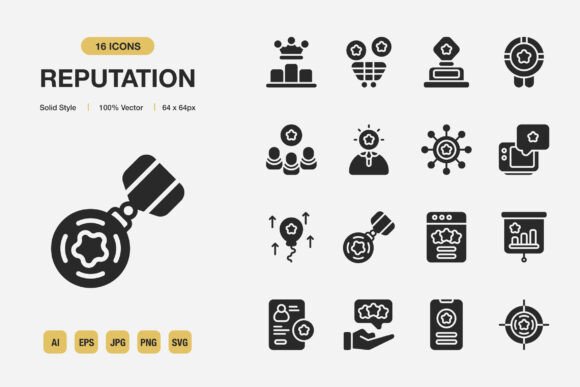
Reputation Solid Icons
Every visual project relies on a handful of core elements, and icons are among the most quietly influential. They guide attention, reduce cognitive load, and anchor brand identity across mediums. Reputation Solid Icons is a curated set of minimalist, high-quality icons built to serve that exact purpose. Whether you are designing a mobile interface, laying out a corporate report, preparing social media graphics, or producing printed marketing collateral, the right icon library can shave hours off your process while keeping the end result cohesive and professional. This collection arrives with everything needed to move from concept to finished asset without friction: source files, web‑ready formats, print‑suitable vectors, and transparent PNGs. Understanding how to position such a resource inside your actual workflow makes all the difference between a tool you occasionally open and one that becomes indispensable.
Where Icon Sets Fit Into a Modern Design Process
Before committing to any visual component, experienced practitioners audit what they will need across phases: ideation, wireframing, high-fidelity design, handoff, and ongoing updates. Reputation Solid Icons can be introduced early as placeholders that already carry the weight of a polished finished product. Since all 100 icons share a solid style and consistent geometric proportions, they establish visual rhythm immediately, even in low-fidelity sketches. This consistency removes the guesswork later when replacing placeholder graphics, because the proportions and line weights remain identical. During wireframing in tools like Figma, Sketch, or Adobe XD, dragging an SVG from the set into a rough layout forces you to think about spacing, hierarchy, and user flow earlier than abstract boxes would. By the time the project reaches visual design, the icons are already embedded and need only minimal color or size adjustments to align with the brand palette.
For print-oriented projects such as brochures, event programs, or signage, starting with vector source files (Adobe Illustrator and EPS Version 10) means that scalability never becomes a bottleneck. A single icon can be blown up to banner size or reduced to a tiny footer detail without quality loss. The solid style holds up particularly well when reversed out of dark backgrounds or printed on textured paper, where thin-line icons might break visually. Because the set is delivered with transparency-aware PNGs at high resolution, quick compositing in raster software like Photoshop or Canva becomes just as practical.
Pre-Project Organization and Compatibility
Before you drag an icon onto a canvas, a small amount of file preparation pays off for months. All files in Reputation Solid Icons are named intuitively and organized by format. Unzipping the package gives you immediate access to SVGs for web and UI projects, EPS and AI sources for print and advanced editing, JPG previews for quick reference, and PNGs with transparency for rapid prototyping. The included Readme.txt documents the license terms, color profiles, and any naming conventions, which is especially helpful when you are passing assets between team members or freelancers. Taking ten minutes to copy the SVGs into a cloud component library or link them inside an Adobe Creative Cloud library means that the entire set becomes available across applications and devices with no repeated downloads.
Compatibility extends beyond file types. Because the icons are constructed with clean vector paths and minimal anchor points, they import cleanly into virtually any design tool: Sketch, Figma, Affinity Designer, CorelDRAW, Inkscape, and even presentation software like PowerPoint or Keynote. In non‑designer hands, such as a marketing coordinator updating a social media template, the PNG versions provide a foolproof drag-and-drop experience. Nothing breaks, nothing needs to be re‑exported. For developers, the SVG files can be dropped directly into code repositories as inline SVGs or served through an icon system, and because the solid style relies on simple fill colors, theming via CSS becomes trivial.
Integrating Icons During Active Design Execution
When you are deep in a layout, the last thing you need is to interrupt your flow with asset hunting. Reputation Solid Icons minimize that friction thanks to their “easy drag and drop” design philosophy. The PNG files with transparent backgrounds slot directly into artboards without any background removal or masking. In vector form, you can copy an SVG from the folder and paste it into a Figma frame, then adjust the fill color to match a brand palette in one click. Because all icons in the set follow the same optical grid, swapping one icon for another later does not disrupt the alignment of nearby text or buttons. This is a small but meaningful detail when a client requests a last-minute icon change; you can hotswap without rebalancing the entire layout.
Customization is built into the very structure of the files. The Adobe Illustrator source file lets you tweak stroke weight, corner radius, or even combine multiple icons into a new symbol. Since the set is “100 customizable,” you are not locked into the original silhouette. You might, for instance, take a simple user icon and add a badge element from another icon to create a verified profile marker, all while preserving the solid style continuity. Business owners and marketers who lack deep vector editing skills can still recolor the SVGs using free online tools or directly in Canva, because the solid fill is a single color value rather than complex gradients or strokes. This openness extends the life of the icon set far beyond a single campaign.
Ensuring Consistency Across Channels
A recurring challenge in multi-channel publishing is keeping visual language uniform. A website might use crisp SVGs at 24px, an Instagram post might feature the same icon at 200px, and a printed flyer might require it at 400dpi in CMYK. Reputation Solid Icons handle this gracefully because the vector source guarantees crisp output at any resolution, while the solid style maintains legibility under different lighting conditions and screen resolutions. When you apply the same icon set to your app onboarding screens, email headers, and print ads, the brand message feels deliberate rather than patched together.
One practical approach is to create a master reference file where you place all the icons you frequently use, colored with your brand’s primary, secondary, and accent colors. Export slices or artboards from there for each platform requirement. Since the set includes both JPG and PNG, you can even pre‑generate raster versions for email clients that strip SVG tags. The transparency in the PNGs also allows for overlaying icons onto photographic backgrounds without a white box ruining the composition. Social media designers, in particular, find this valuable when creating story templates, quote cards, or event reminders that need professional polish without starting from scratch every time.
Workflow Examples Across Different Project Types
Consider a small business launching a new product line. The owner needs icons for the website feature grid, the packaging label, the Instagram shop header, and the printed quick-start guide. Instead of pulling icons from five different marketplaces, each with slightly different line weights and styles, they can rely entirely on Reputation Solid Icons. The website developer receives the SVG folder and integrates icons using an optimized sprite. The package designer opens the EPS file in Illustrator, converts the icons to spot colors for a two‑color print run, and sends the file to the printer. The social media manager downloads the PNGs, drags them into a Canva template, and schedules the posts. The printed guide designer takes the same SVGs, scales them to 1‑inch tall without degradation, and places them next to step‑by‑step instructions. Every touchpoint looks coordinated, yet no one spent extra hours reconciling mismatched assets.
For digital product teams, the set integrates into a design system. A UI designer can map each icon to a component with properties for size, color, and orientation. Later, when user testing suggests a different icon metaphor for a navigation item, swapping the icon source while retaining the component properties updates every instance across the product. Because the icons are minimal and solid, they scale well from a 16px tab bar to a 56px empty state illustration element. The predictability of the solid style also helps when building touch targets; the filled shape creates a larger perceived hit area compared to a thin-line icon, which can improve mobile usability slightly.
Long-Term Use and Asset Management
Icons bought piecemeal or as part of a limited subscription can become a headache when licenses expire or source files disappear. Reputation Solid Icons are delivered as a self-contained package with no dependency on third-party libraries or fonts. The source Adobe Illustrator file and EPS Version 10 provide an archival format that will open decades from now in legacy software. Storing this master folder in a backed‑up cloud drive along with a text file of your brand’s color hex codes gives you a permanent icon utility you can revisit across future projects, even if the original design team moves on.
Another advantage of a complete set is the removal of decision fatigue. When you know you have exactly one high‑quality icon for most common concepts—alerts, users, settings, search, messaging, documents, and more—you stop browsing multiple marketplaces and second‑guessing style mismatches. The solid aesthetic is versatile enough to work for fintech dashboards, educational books, wellness apps, and event invitations alike. For those who produce content regularly, such as bloggers creating downloadable worksheets or educators designing slide decks, having a pre‑curated icon set speeds up asset creation dramatically. You drop in the right PNG, and you are done. No cropping, no background removal, no adjustment layers.
Practical Tips for First-Time Use
When you receive the pack, start by opening the Readme.txt. It explains the color profiles and any specific notes about the EPS compatibility. Next, duplicate the folder and keep the original untouched. Inside your working copy, create subfolders for “Branded SVGs” and “Branded PNGs” where you will place recolored versions. Batch-recoloring SVGs is easiest in Adobe Illustrator using the Edit Colors feature, but you can also open them in a code editor and replace fill codes if you are comfortable with regex. Once recolored, export from Illustrator as SVG, or use a free converter to generate the exact PNG sizes you need for standard web and social dimensions.
For non‑designers who just need images for slides or social posts, the JPG and PNG files are your most immediate path. Open a template, drag the file in, and resize. Because the icons are solid and simple, they remain legible even when compressed by email or messaging apps—an important detail when sending quick proofs to clients. If you regularly use presentation software, embed the PNGs into a master slide deck so that any presenter can access consistent icons without touching the source files. This simple step prevents mismatched icon styles sneaking into company-wide presentations.
Growing Your Visual Language Over Time
The solid style of Reputation Solid Icons acts as a foundation that can be extended. If you later need a custom icon that does not exist in the set, having the original Adobe Illustrator source file lets you study the construction logic—stroke weight, corner style, pixel grid alignment—and replicate it in new icons. This keeps your brand’s iconography family consistent even as you commission or create additional pieces. The EPS format further ensures that print partners can open and modify files without needing the latest Creative Cloud version.
In practice, many teams build a small internal library of heavily used icons, combined with the full set as a repository for less frequent needs. The “100 customizable” nature means you are not just buying 100 static images; you are acquiring 100 flexible starting points that can evolve with your brand. Over months and years, the return on time saved and design harmony maintained far outweighs the initial acquisition. For entrepreneurs and freelance designers who manage multiple client identities, the set functions as a reliable baseline that adapts quickly to different brand guidelines through simple color swaps and occasional slight modifications.
Ultimately, Reputation Solid Icons remove the invisible cost of inconsistent visuals. Every project, whether a mobile app interface, a printed brochure, an infographic, or a social media banner, benefits from having a trustworthy, cohesive icon source. With widely compatible file formats, transparent raster options, and fully editable vector originals, the collection fits neatly into existing pipelines without requiring new software or steep learning curves. The solid, minimalist aesthetic supports readability and brand presence across wildly different contexts, making it a practical choice for anyone who values efficiency and professional finish equally.