Shield Icons: Versatile Visuals for Any Project
Modern design work demands assets that communicate trust, protection, and stability at a glance. A well-crafted shield icon does exactly that. Whether you are building a cybersecurity dashboard, designing a badge for a fitness app, or laying out a nonprofit’s annual report, shield icons bring an immediate sense of security and authority. This comprehensive set of high‑quality shield icons combines minimalist aesthetics with true adaptability, making it easy to elevate your next project without starting from scratch. With editable strokes, multiple file formats, and simple drag‑and‑drop functionality, the pack is built to serve creators across every medium.
What Makes This Shield Icon Collection Stand Out
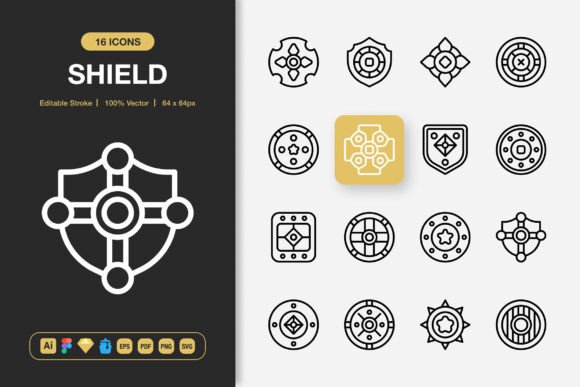
Not all icon sets are created equal. The difference lies in the details that let you fully control the final look. These shield icons are designed with precision geometry and clean lines, but they remain 100% customizable. You can adjust the stroke weight, round the corners, change the color palette, or even tweak individual anchor points to match your brand identity. Because the set includes source files for Adobe Illustrator, Figma, Sketch, and IconJar, you never have to worry about compatibility. Every icon is built on a consistent grid, so icons scale uniformly whether you are working at 32 pixels or 512 pixels.
The pack also covers a broad range of shield styles. From classic heraldic outlines to modern security badges, from checkmark‑infused protection marks to hollow frames ready for your own typography, variety keeps your design language fresh. The high‑quality output ensures that even at large sizes for banners or posters, the strokes remain crisp. For digital interfaces, the included PNGs at seven common sizes—32px, 48px, 64px, 96px, 128px, 256px, and 512px—make implementation immediate, while vector versions let you export at any resolution without loss.
Creative Applications Across Digital and Physical Media
Icons are small, but their impact is far from minor. Shield icons carry an inherent message that works across industries and formats. Let’s walk through realistic ways designers, marketers, and content creators are putting these assets to work.
Websites and User Interfaces
Navigation menus, feature cards, and trust signals all benefit from a clear visual metaphor. Replace generic bullet points with a compact shield icon to highlight security features on a SaaS landing page. Use a slightly bolder, filled version to indicate verified status or premium tiers. Because the stroke is editable, you can make icons consistent with your existing UI line weight. The drag‑and‑drop nature of Figma and Sketch files means you can pull an icon straight into your component library and start prototyping in seconds. Developers will appreciate the clean SVG files that render beautifully on retina screens without adding page weight.
Mobile App Development
Mobile screens rely on instant recognition. A shield icon can function as a tab bar item for a safety‑oriented app, a status indicator in a health tracker, or a button for a reporting feature. The set’s minimalist design language keeps the icon readable at small sizes. Pair a thin‑stroke shield with a rounded background to create a modern badge for onboarding flows. With the included IconJar file, organizing and searching for the right shield variant becomes seamless. You can even customize a shield to animate a subtle micro‑interaction, reinforcing user confidence during sensitive actions like password changes or transaction confirmations.
Infographics and Data Visualization
Data stories often involve comparisons of protection levels, market security, or compliance rates. Shield icons turn abstract numbers into understandable visuals. Use a series of partially filled shield outlines to illustrate survey results about perceived safety. Place a shield icon next to cybersecurity statistics to draw the reader’s eye. The scalability of vector files means you can enlarge an icon for a key data point without any quality loss. Because the pack includes EPS and PDF formats, you can integrate these icons into professional tools like Adobe Illustrator or InDesign with zero friction.
Branding and Identity Design
Shields have long been associated with legacy, excellence, and assurance. Freelancers creating logo marks for coaching businesses, insurance agencies, or family foundations can adapt the basic shield shape into a distinctive brand symbol. The editable stroke feature lets you match the exact line thickness of your wordmark. Start with a standard outline, then add a monogram inside, or split the shield into two‑color segments for a modern tech feel. Because the source files are fully layered, you can isolate paths and experiment with gradients, shadows, or strokes with ease.
Print and Physical Media
Brochures, event badges, certificates, and conference banners all gain authority when shield icons appear. The set’s high‑resolution PNGs ensure you can drop an icon into a flyer layout without worrying about pixelation. For large‑format printing, use the EPS or PDF files to maintain vector sharpness. Try placing a shield icon next to a guarantee statement on a promotional poster. The icon acts as a silent seal of trust that reinforces your message. The lightweight nature of the SVG files also makes them suitable for hybrid print‑digital projects, such as QR code‑enabled business cards that direct users to a secure landing page.
Social Media and Marketing Graphics
Visuals for social feeds compete for attention in a crowded scroll. Shield icons can frame a special offer, lock in a limited‑time discount, or badge a customer testimonial. The set’s multiple sizes mean you can quickly pull a 128px PNG for a tweet or a 256px version for an Instagram story without resizing guesswork. Combine a shield with bold typography and your brand colors to create a cohesive set of templates for promotions. The clean, minimalist design ensures the icon complements rather than clutters your composition.
Practical Tips for Getting the Most from Your Icons
Having a large icon collection is only the start. A few intentional habits will help you maintain consistency and speed across all your projects. First, always work from the master files—the Adobe Illustrator or Figma source—when you need to make global edits. Adjust the stroke width once, then apply that change to multiple icons at a time. If you are working on a web project, stick to a uniform viewBox in SVG exports so every icon aligns in your code. Use the IconJar file to tag and organize your most‑used shields, effectively creating a personal design system that you can access instantly.
Customization goes beyond stroke and color. Because every icon is built with clean paths, you can delete or combine elements to create hybrid symbols. A shield merged with a lock, a heart, or a star can yield a unique icon that still reads immediately. When you use the drag‑and‑drop feature in Sketch or Figma, make sure your team uses the same library version to avoid visual drift. The included Readme.txt provides a clear overview of all file locations and recommended workflows, so even someone new to the pack can onboard quickly.
Scalability is your ally. The PNGs at seven different sizes cover most direct use cases, but for dynamic outputs—like a responsive website or a presentation that might be projected on a large screen—always default to the SVG or EPS vector versions. This practice future‑proofs your design because you can export an icon at 1024px or beyond without any degradation. Additionally, the transparent background in PNGs allows for layering over hero images or textured backgrounds without awkward white boxes.
Who Benefits the Most from This Icon Pack
The versatility of shield icons crosses professional boundaries. UX and UI designers gain a ready‑to‑use asset for trust‑building interface elements. Freelance graphic designers can accelerate client work by pulling from a pre‑built library that fits multiple brand personalities. Marketers and content creators add a layer of professionalism to lead magnets, email headers, and social posts without calling a designer for every asset. Small business owners maintaining their own website or print materials find drag‑and‑drop simplicity that saves hours of fiddling. Even educators and publishers creating worksheets, certificates, or book covers can incorporate shields to denote completion, protection, or achievement.
Developers who work directly with SVG code will appreciate the clean markup that integrates smoothly into modern front‑end frameworks. The set avoids inflated path data, so performance remains snappy. Hobbyists exploring personal projects—a gaming clan logo, a community newsletter, a wedding shield—can experiment without technical barriers thanks to the inclusion of transparent PNGs and a straightforward file structure.
Bringing a Consistent Shield Language to Your Next Idea
Every project has a voice, and icons shape how that voice is perceived. A set of shield icons, when used thoughtfully, creates a subtle layer of meaning that speaks about safety, honor, and durability. Instead of hunting for mismatched icons across the web, you can pull from a unified toolkit that covers everything from a delicate outline to a bold, filled emblem. The editable stroke gives you the freedom to echo your existing design system, while the broad format support ensures no platform is left out.
Think about the last time an app, a poster, or a document made you stop and trust it. Often that trust comes from visual cues you barely notice—a consistent color, a clean line, a small symbol that feels deliberate. Shield icons, when used with restraint and purpose, become one of those cues. They work quietly to reinforce credibility and help your audience navigate with confidence. Whether you are polishing a mobile experience or printing a banner for a local event, these icons deliver the precision and adaptability you need. So open your design tool, drop in a shield, and see how quickly a single element can pull an entire composition together.