Social Policy Solid Icons for Modern Design Projects
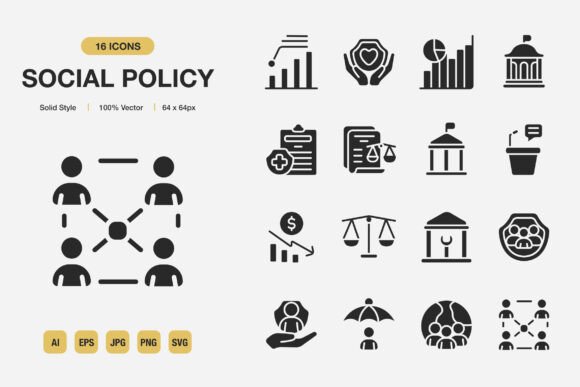
Finding the right visual language for social policy topics takes patience. Abstract concepts like community support, healthcare access, housing equity, and family welfare often need crisp, universally understood symbols to cut through complexity. A well-designed icon set can transform a dense report into an accessible infographic or give a nonprofit website the clarity it needs to engage visitors. The Social Policy Solid Icons collection was built precisely for these moments—a carefully crafted set of high-quality, solid-style icons that slot straight into print, digital, and presentation work without friction.
What sets this resource apart is how much practical thought went into the file bundle rather than just the artwork. You get the icons in multiple formats, each suited to a different stage of your workflow. The package includes the source Adobe Illustrator file, an EPS version 10 file for legacy compatibility, a high-resolution JPG file for quick placement, an SVG file for scalable web use, and a PNG file with transparency for immediate drag-and-drop onto colored backgrounds. A Readme.txt file walks you through the basics, so you won't waste time guessing about licensing or layer structure. That broad format coverage means you can drop these icons into Sketch, Figma, Canva, Affinity Designer, PowerPoint, or any tool you already use without needing to convert anything first.
The solid style itself is a deliberate choice. Solid icons read clearly at small sizes, hold up well on busy layouts, and carry a sense of authority that works especially well for policy-oriented content. Whether you're designing a municipal website, laying out an annual impact report for a foundation, or creating social media tiles for a public awareness campaign, these icons maintain their weight and legibility. Because they are 100% customizable, you are never locked into a single color or proportion. You can open the vector source file, recolor everything to match a brand palette in seconds, scale any icon without quality loss, and even tweak individual anchor points if you need to adjust a silhouette for a unique use case.
What’s Included and Why the File Variety Matters
Designers often juggle multiple tools across a single project. You might storyboard a flyer in Illustrator, build presentation slides in Keynote, and then need a transparent PNG for a website hero image. Having one icon represented in AI, EPS, SVG, PNG, and JPG formats eliminates repetitive export chores. The source AI file gives full editing control, while the EPS ensures you can share with colleagues using older software. SVG is the modern standard for web and mobile interfaces—lightweight, resolution-independent, and easy to animate if needed. The PNG with transparency is a workhorse for quick mockups, social media graphics, and e-book covers. The included JPG is handy when you just need a flattened image for a blog post or a printed handout without worrying about file size. This practical approach means you can focus on message and layout instead of asset management.
Where These Icons Make the Biggest Difference
Icons are not decoration; they are navigation cues, visual metaphors, and shortcuts to understanding. In social policy communication, where concepts like eligibility, enrollment, advocacy, and resource allocation can feel bureaucratic, the right symbol can humanize a data point. A solid icon depicting a family unit or a supportive hand transforms a statistic into a story. Here are a few everyday scenarios where the Social Policy Solid Icons set proves its value:
- Nonprofit websites and donation pages. Icons can guide visitors toward program information, success stories, or volunteer sign-ups without overwhelming text. A consistent solid style builds trust and visual cohesion across the entire site.
- Government and municipal portals. Residents searching for services need intuitive wayfinding. Icons for health clinics, housing assistance, senior services, or public transportation make navigation faster and reduce bounce rates.
- Infographics and data visualization. Pairing a clean icon with a statistic about food security or educational attainment helps audiences grasp the scale of an issue immediately. Because these icons are vector, you can enlarge them for poster-sized infographics without pixelation.
- Printed flyers and community bulletins. Local outreach often relies on simple, eye-catching flyers posted in libraries and community centers. The JPG and PNG files drop straight into a Word document or a Canva template, making it easy for staff with limited design experience to produce professional-looking materials.
- Educational resources and textbooks. Publishers can use SVG icons in e-books or PDFs to label chapters, highlight key concepts, or create visual glossaries. The clean solid style doesn't distract from the text and remains crisp on e-ink and tablet screens.
- Social media campaigns and slide decks. Consistent icons across Instagram posts, LinkedIn infographics, and PowerPoint presentations reinforce brand identity and make complex policy announcements feel more approachable.
Customization: Make the Icons Yours in Minutes
No icon set should force you into someone else's aesthetic. The source Adobe Illustrator file gives you complete control. You can change the fill color to any hex value, apply gradient fills if that suits your brand, or adjust the stroke weight for a different feel—though the solid style is designed to stand on its own, you are never limited. The 100% customizable promise means you can remove unwanted elements, combine icons to build new ones, or even convert them to outlined paths for laser engraving or vinyl cutting. Designers working in Figma can import the SVG files and use Figma's color overrides to create component libraries that update across every frame automatically. Even non-designers can take the PNG files, open them in a free tool like Canva or Photopea, and apply tint overlays or drop shadows in a few clicks. The drag-and-drop ease is genuine: grab the icon you need, drop it onto your canvas, and resize to fit.
Practical Benefits for Teams and Solo Creators
Efficiency is the quiet superpower of a well-organized icon pack. When you don't have to hunt for royalty-free images or commission custom illustrations for every campaign, you shorten production timelines significantly. For marketing teams managing multiple social channels, having a consistent set of solid icons means any team member can pull an asset without style drift. Educators and instructional designers often work on tight deadlines; having a folder of ready-to-use SVG icons that can be recolored to match a course template saves hours of tweaking. The unified solid style also contributes to better accessibility: high-contrast, simple shapes are easier for screen magnification software and for users with low vision to parse, provided you use appropriate alt text and sufficient color contrast ratios.
From a branding standpoint, customizability is everything. A nonprofit might need icons in their signature green; a think tank might want them in grayscale for a formal white paper. Because you control the color globally, you can adapt the same icon set for both an annual report and a youth-focused social media story without buying or downloading anything else. The transparent PNGs let you place icons over photographs or textured backgrounds cleanly, which is a common design request for hero banners and event posters.
Choosing and Working with Social Policy Icons
When evaluating any icon set, especially one tied to sensitive topics like social policy, consider these factors:
- Concept coverage. Does the set include symbols for the specific areas you discuss regularly—healthcare, education, housing, justice, family services, disability, employment? A broad thematic range reduces the need to mix styles from other sources.
- Style consistency. Solid icons should have a uniform visual weight, line thickness, and level of detail. Icons that look mismatched undermine professionalism, so a cohesive set like this one keeps everything visually aligned.
- File format flexibility. Choose a bundle that gives you vector originals and web-ready formats. Avoid purchasing from platforms that only offer one format unless you are certain you'll never need to scale up for print or convert for a new platform later.
- Licensing clarity. The included Readme.txt file is your first stop. It should explain whether the icons are free for personal and commercial use, require attribution, or come with any restrictions. Always verify that the license aligns with how you plan to use the icons—especially in client work or products for resale.
- Ease of integration. Drag-and-drop compatibility with your primary design tool is not just a convenience; it prevents technical hiccups that stall your workflow. Icons that open cleanly in Illustrator and Figma with proper layers and groups are a sign of professional preparation.
Real-World Workflows with the Icon Set
Imagine a public health department launching a campaign about vaccination access. The graphic designer pulls the AI source file, selects a family icon and a medical cross icon, recolors both to match the city's official palette, and exports them as SVGs for the campaign landing page. The same icons, exported as high-resolution PNGs, appear on bilingual flyers printed for community centers. The social media coordinator grabs the JPG versions to create quick Twitter posts without opening a design program. Later, an evaluator compiles a PDF report, dropping the PNG files into charts that show service utilization by district. The entire campaign maintains a unified visual language with zero additional illustration costs.
Another scenario: a freelance education writer creates an e-book about social welfare history. She uses the SVG icons as chapter dividers in her layout software, tints them a subtle sepia to match the book's tone, and exports directly to EPUB. The icons remain sharp on Kindle devices and tablets, adding a polished, professional layer without distracting from the scholarly content.
For developers, the SVG files are a lightweight asset ready to be inserted inline into HTML or imported into a React component. You can manipulate fill colors through CSS, animate icons with SMIL or JavaScript, and even use them as part of a design system. The solid style simplifies accessibility implementation because you can easily set `role="img"` and provide meaningful `aria-label` attributes for screen readers.
Why Solid Icons Continue to Be a Smart Choice
Design trends shift, but solid icons remain a staple because they communicate quickly and adapt across mediums. They feel grounded and confident, which aligns well with the seriousness of social policy topics. Unlike outline or duotone styles, solid icons don't become faint when scaled down or placed on low-contrast backgrounds. Their filled shapes also lend themselves well to knocking out into white for dark-mode interfaces—an increasing requirement for modern web and mobile apps.
The Social Policy Solid Icons package respects the user's need for speed, quality, and creative freedom. You are not locked into a single software ecosystem, and you don't need advanced vector editing skills to make basic color changes. The drag-and-drop philosophy behind the collection means you can pull an icon from the folder, drop it onto your canvas, and immediately see if it works compositionally. If not, swap in another one without penalty. This low-friction approach encourages experimentation and helps creators of all skill levels produce work that looks considered and intentional.
As you plan your next project—whether it's a website redesign, a grant proposal deck, a teaching resource, or a community newsletter—consider how these icons might reduce your production time while raising the visual standard. The included Readme file answers common questions and sets clear expectations, which is the kind of thoughtful touch that separates a generic icon download from a genuinely useful resource kit. I hope you like this set and find it a reliable addition to your design toolkit. Thanks for giving it a look.