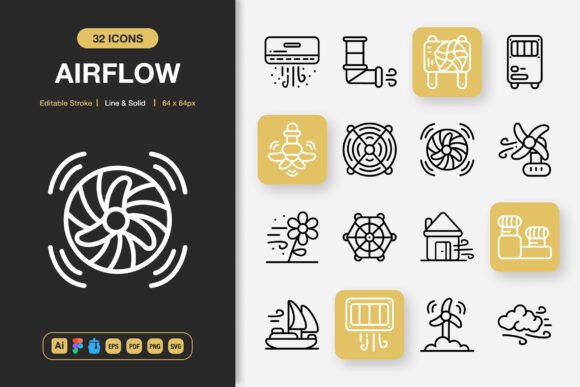
Airflow Icons: Versatile Icon Set for Every Creative Toolbox
When a project needs to communicate with clarity, speed, and a breath of fresh air, the visual shorthand of well-designed icons becomes non-negotiable. Airflow Icons arrive as a meticulously crafted resource that bridges the gap between aesthetic simplicity and functional power. This is not just another icon pack—it’s a flexible design system, equally at home in a minimalist website hero section, a dense mobile app dashboard, a printed event flyer, or a multi-layered infographic. Built for creators who need tools that adapt rather than constrain, Airflow Icons give you the freedom to shape interfaces and narratives without wrestling with inconsistent line weights or clumsy file formats.
What Makes Airflow Icons Stand Out
At first glance, you’ll notice the visual calm. Every glyph carries a sense of lightness and purpose, using geometry that feels both contemporary and timeless. But beneath that clean surface lies a deep layer of engineering that professionals will appreciate immediately. The set doesn’t force you to choose between outline and filled silhouettes; it delivers both as a unified language. You can mix line and solid styles within the same project without jarring contrasts, because the proportions, corner radii, and optical balance were designed as a single family.
The editable stroke capability deserves its own spotlight. In practice, this means you’re not stuck with a fixed thickness. If your brand guidelines call for a thinner, more delicate stroke, you adjust it in one click inside Illustrator or Figma. Need a bolder presence for a tradeshow banner? Thicken the strokes and the icons still read perfectly. That level of control extends to every anchor point—the files are built cleanly, with intelligently named layers, so you can recolor, reshape, or even combine icons into custom symbols without starting from scratch.
The Real-World Impact of a Drag-and-Drop Workflow
Speed often determines whether a great idea gets executed or shelved. Airflow Icons are optimized for frictionless integration. When you’re prototyping a mobile app in Figma, you don’t want to dig through multiple folders, convert file formats, or fix alignment. You drag an icon onto the canvas, and it snaps into the pixel grid as if it was designed for that exact spot. The same ease applies to web design, where SVG files with clean code drop directly into your markup, ready for CSS manipulation. For print designers who dread the moment digital assets crumble at high resolution, the included EPS and PDF versions preserve vector fidelity from business cards to billboards.
This drag-and-drop philosophy also accelerates the less glamorous parts of a project: when a client asks for three variations of an icon 10 minutes before a presentation, you can pull solid, line, and inverted versions in seconds. The Iconjar file centralizes your library, making it searchable and organized—perfect for teams that need to maintain brand consistency across dozens of assets.
A Format for Every Toolchain
One of the quiet frustrations in creative work is receiving a brilliant asset that’s trapped in a format you can’t open. Airflow Icons eliminate that barrier with an unusually generous file stack. The source file in Adobe Illustrator (.ai) serves as the master, giving you full editable vectors. The Figma file puts the same power directly into the collaborative browser-based environment where so much product and web design happens today. For those who use Mac-based icon management, the Iconjar file integrates the entire collection into a searchable, drag-anywhere library.
When you need to hand off assets to a developer or import into a different program, the SVG and EPS (Version 10) files ensure no detail is lost. SVG is ideal for responsive web and app interfaces, allowing you to control colors and animation with code. EPS holds up for legacy print workflows or sign-making software. The PDF file serves as a universal safety net, and transparent PNG exports come in multiple sizes for quick social media graphics or mockups. A Readme.txt document ties everything together with simple guidance, so you’re never left guessing about licensing or installation.
Websites and Landing Pages
Think of the small moments that define a visitor’s perception: the service section that uses three icons to break down complex offerings, the feature comparison table that relies on checkmarks and cross symbols, the notification dot that signals a new message. Airflow Icons thrive in these roles because they stay out of the way while adding polish. Pair the line style for a soft, airy header area and switch to solid icons in the footer call-to-action buttons. The consistent visual weight means your page won’t feel cluttered.
Mobile App Interfaces
Pixel-perfect clarity is non-negotiable on small screens. Airflow Icons have been crafted with touch targets and readability in mind. The solid versions work beautifully for tab bars and floating action buttons, while the line style gives navigation drawers a modern, approachable feel. Since you can edit strokes individually, you can increase the thickness slightly to account for lower-resolution screens—a subtle tweak that dramatically improves legibility without redesigning anything.
Print and Editorial Design
Books, magazines, and corporate reports often suffer from icon sets that feel either too playful or too sterile. Airflow Icons hit a balance that elevates infographics without distracting from the data. For a nonprofit annual report, use the circle-based icons in a soft grey to guide readers through statistical highlights. On a cookbook cover, the solid vegetable and utensil icons, slightly recolored, create a playful but elegant pattern. The EPS files allow you to scale infinitely, so even large-format posters remain crisp. When designing flyers for a community event, drag a few relevant icons—a calendar, a map pin, a microphone—and instantly add structure without hiring an illustrator.
Social Media and Content Marketing
Stopping the scroll on platforms like Instagram or LinkedIn demands quick visual hooks. Carousel posts that teach a step-by-step process become far more engaging when each step has a consistent, minimalist icon. Blog featured images can incorporate a subtle icon in the corner as a visual signature. With transparent PNGs, you can layer icons over lifestyle photos without white-box syndrome. For a marketing agency, creating a unified icon style for client social media templates saves hours while maintaining a premium look.
Infographics and Data Visualization
Numbers tell a story, but icons make it memorable. Airflow Icons include a wide range of categories—technology, business, nature, health, communication—so you can replace generic placeholder circles with meaningful symbols. In a comparison infographic, a lightbulb icon can denote ideas, a shield for security, a rocket for growth. Because you have full customization, you can assign brand colors to different icon states, creating a visual system that guides the eye logically through complex information.
How to Keep Your Icon-Driven Projects Consistent and Original
With such a rich set at your fingertips, the risk of visual overload is real. The secret to harnessing Airflow Icons fully lies in establishing a small set of rules before you start dragging. Decide on a stroke-to-solid ratio for the project. Perhaps 80% line icons for UI elements and 20% solid for emphasis—or vice versa for a bolder identity. Limit your palette to two or three accent colors and one neutral. This restraint makes every icon feel intentional.
Look for opportunities to combine icons into compound meanings. A cloud icon next to a lock can imply secure cloud storage; a globe beside a handshake signals international partnership. The editable nature of the set means you can fuse elements in Illustrator or Figma to create custom symbols that still match the family style. When doing this, keep the original line thickness and corner style unchanged—that’s the thread that holds your brand’s visual language together.
Accessibility should influence your icon choices as well. For web and app interfaces, ensure that icons that convey status (success, warning, error) are paired with text labels or have sufficient color contrast. Airflow Icons’ clean shapes hold up well under color inversion for dark modes, but you should test them at small sizes. The editable stroke feature helps here: you can bulk-adjust thickness to meet WCAG contrast recommendations without losing the design’s character.
Integrating Icons into Your Existing Workflow
The true test of any design asset is how it behaves during a tight deadline. Set up a master Figma component or Adobe Illustrator symbol library using Airflow Icons as your base. From that master, create overrides for common states: hover, active, inactive, error. Having these ready means you can prototype entire user flows in minutes. If you work with a front-end developer, export the SVG code for the icons you use most and build a small sprite sheet; the clean markup from Airflow Icons minimizes rendering quirks.
For content creators who aren’t full-time designers, the transparent PNGs are a gateway. Use them in Canva or Google Slides presentations—the resolution holds up on large screens, and the minimalist aesthetic helps non-designers create materials that don’t look amateur. The included Readme file offers practical starting tips, making the set welcoming even if you’re new to working with vector assets.
Beyond the Default: Customizing and Personalizing
High-quality icons are a starting point, not a finish line. Airflow Icons invite you to tailor every detail. Adjust curves to echo your logo’s geometry. Animate the solid shapes for a loading screen that feels alive. Extract individual anchor points to create partial icons that hint at concepts rather than declaring them literally—an approach that works wonders for tech startups who want to convey innovation without falling back on overused symbols. Because the source files are fully layered, you can even break apart multi-part icons and use only the section that matters. A magnifying glass alone becomes a search symbol; combine the outline of a person with a gear inside for a settings profile. The 100% customizability isn’t just a bullet point—it’s permission to experiment.
Why This Set Fits Creators, Marketers, and Business Owners Alike
A freelance graphic designer building a portfolio site, a marketing manager preparing a campaign launch deck, a blogger creating a workbook for subscribers—all share a common need: visual tools that save time without compromising on quality. Airflow Icons bridge the gap between premium design and everyday practicality. They don’t require you to master complex software to get professional results; the simple drag-and-drop promise holds true whether you’re placing a lightbulb icon in a Keynote slide or coding an SVG into a React component.
For small business owners, the value multiplies over time. Invest once in a comprehensive icon family, and you can sustain a consistent look across your website, email newsletters, printed menus, event signage, and employee onboarding documents. As your brand evolves, you can tweak stroke colors and thickness to match a refresh without searching for new assets. That long-term adaptability is what separates a disposable resource from a real design partner.
Bring It All Together
Airflow Icons succeed not because they are flashy, but because they work hard and stay quiet. Their minimalist nature amplifies your content rather than competing with it. The dual line and solid styles give you two distinct voices within one family; the extensive file formats erase technical friction; the customizability turns every icon into a building block for something uniquely yours. Whether you’re designing a mobile app, laying out a research poster, or creating a social media story that needs to be understood in a single breath, this set provides the visual vocabulary to say more with less.
Your next project deserves icons that feel like they were designed exactly for it. Airflow Icons hand you that precision, along with the flexibility to reshape them as your vision grows. Less effort on hunting, adjusting, and converting means more energy for the creative work that actually moves people. That’s the quiet promise embedded in every SVG path and editable stroke. So open up the file you need, drag in the first icon, and watch how quickly your idea gains a polished, professional edge.